

Organizing Your Apple Search Ads
Running Search Ads on the App Store is a big component to any successful UA and ASO strategy on the App Store. In addition to acquiring new users and gaining keyword-level insights, the Apple Search Ads "Creative Ad Sets" are a unique way to run split tests on the App Store. We’ve talked in the past about how to structure a thriving Discovery Campaign. Today, let’s look at some ways to structure the rest of your campaigns.
 Having different campaigns also allows you to target users more effectively. By breaking campaigns into this recommended strategy, you'll be able to gain insights on the performance of specific keywords, discover new terms with Apple's "Search Match" feature and broad match keywords, along with defending your brand from competitors.
Brand Defense: We refer to campaigns that are bidding on your own branded keywords as "Brand Defense". By creating a campaign in which you're bidding on your own brand traffic, you can prevent competitors from stealing your users. To learn more about practicing brand defense, check out one of our past blog posts.
Having different campaigns also allows you to target users more effectively. By breaking campaigns into this recommended strategy, you'll be able to gain insights on the performance of specific keywords, discover new terms with Apple's "Search Match" feature and broad match keywords, along with defending your brand from competitors.
Brand Defense: We refer to campaigns that are bidding on your own branded keywords as "Brand Defense". By creating a campaign in which you're bidding on your own brand traffic, you can prevent competitors from stealing your users. To learn more about practicing brand defense, check out one of our past blog posts.
 Understanding the differences between Broad and Exact match is crucial when it comes to setting up your campaigns and ad groups. If an ad group uses all Exact Match keywords, the amount of traffic those ads will receive is very dependent on the actual volume score of each keyword. Additionally, the management for Exact Match keywords is slightly easier because it's a matter of adjusting bids and looking at the Keyword level metrics. Using Broad Match, Apple's system will branch out to find additional keywords and it may be "easier" to spend a larger amount. The management of a broad match ad group is a little more challenging because it requires bid adjustments on the keyword level, and then auditing the Search Terms to discover the additional keywords Apple's system has displayed your ad for. Based on the performance of each Search Term, you can determine whether or not you should add it as a negative, or consider bidding on the keyword with an exact match strategy.
We recommend separating keywords into ad groups by match type. Example: set up a “generic” campaign (targeting non-brand keywords) that contains two ad groups, one has all broad match keywords and the other exact match keywords. The broad match ad group should also include all of the exact match terms as Negative Keywords in order to prevent overlap between the ad groups.
Understanding the differences between Broad and Exact match is crucial when it comes to setting up your campaigns and ad groups. If an ad group uses all Exact Match keywords, the amount of traffic those ads will receive is very dependent on the actual volume score of each keyword. Additionally, the management for Exact Match keywords is slightly easier because it's a matter of adjusting bids and looking at the Keyword level metrics. Using Broad Match, Apple's system will branch out to find additional keywords and it may be "easier" to spend a larger amount. The management of a broad match ad group is a little more challenging because it requires bid adjustments on the keyword level, and then auditing the Search Terms to discover the additional keywords Apple's system has displayed your ad for. Based on the performance of each Search Term, you can determine whether or not you should add it as a negative, or consider bidding on the keyword with an exact match strategy.
We recommend separating keywords into ad groups by match type. Example: set up a “generic” campaign (targeting non-brand keywords) that contains two ad groups, one has all broad match keywords and the other exact match keywords. The broad match ad group should also include all of the exact match terms as Negative Keywords in order to prevent overlap between the ad groups.
Back to the blogRunning Multiple Campaigns
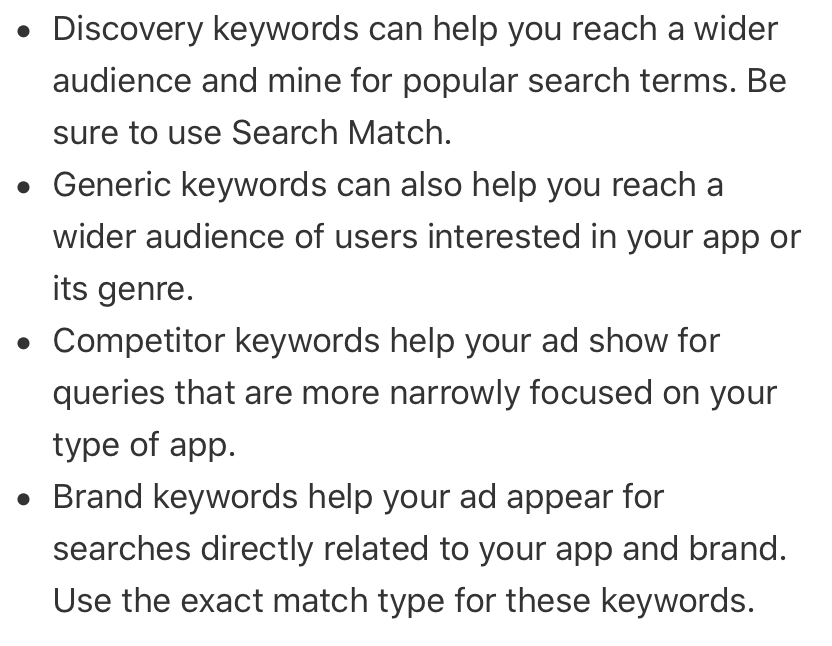
Segmenting out keywords by a "theme" or group" into different campaigns allows you to have more control over your bidding and spending, rather than lumping everything together into one campaign. Breaking down your strategy into multiple campaigns makes the management and analysis process much easier. Apple gives you four recommendations on how to separate out keywords:
Having different campaigns also allows you to target users more effectively. By breaking campaigns into this recommended strategy, you'll be able to gain insights on the performance of specific keywords, discover new terms with Apple's "Search Match" feature and broad match keywords, along with defending your brand from competitors.
Brand Defense: We refer to campaigns that are bidding on your own branded keywords as "Brand Defense". By creating a campaign in which you're bidding on your own brand traffic, you can prevent competitors from stealing your users. To learn more about practicing brand defense, check out one of our past blog posts.
Exact vs Broad Match Keywords
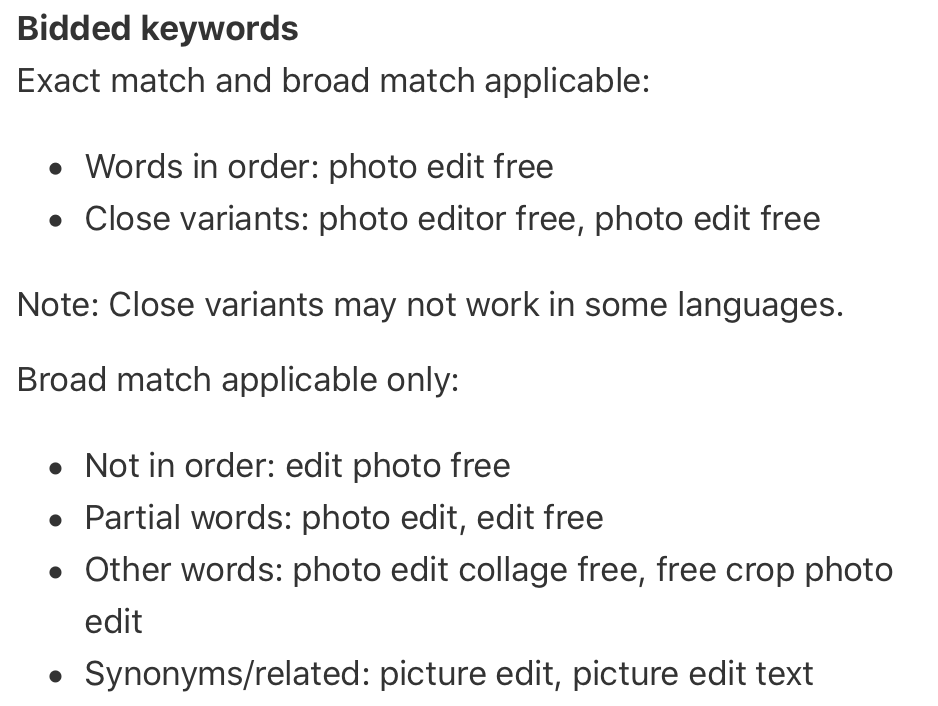
Apple provides two "match types" for every keyword you add to your campaigns: Broad match: This is the default setting when adding keywords and this allows Apple's auction system to display your ad for variants of your entered keyword. For example, a broad match keyword might bid on searches that are synonyms of your keyword, is a misspelling or is deemed related by Apple’s algorithm. Broad match keywords are best utilized in your discovery campaigns to identify new keyword opportunities. Exact Match: An exact match keyword will only bid on that exact keyword and extremely close variants of that term. Exact matches can include plurals, common misspellings or a minor change to one word ("photo edit free" would exact match with "photo editor free"). Exact match is the best option to use when you only want to bid on that specific term, and do not need/want Apple's help identifying new keywords.
Understanding the differences between Broad and Exact match is crucial when it comes to setting up your campaigns and ad groups. If an ad group uses all Exact Match keywords, the amount of traffic those ads will receive is very dependent on the actual volume score of each keyword. Additionally, the management for Exact Match keywords is slightly easier because it's a matter of adjusting bids and looking at the Keyword level metrics. Using Broad Match, Apple's system will branch out to find additional keywords and it may be "easier" to spend a larger amount. The management of a broad match ad group is a little more challenging because it requires bid adjustments on the keyword level, and then auditing the Search Terms to discover the additional keywords Apple's system has displayed your ad for. Based on the performance of each Search Term, you can determine whether or not you should add it as a negative, or consider bidding on the keyword with an exact match strategy.
We recommend separating keywords into ad groups by match type. Example: set up a “generic” campaign (targeting non-brand keywords) that contains two ad groups, one has all broad match keywords and the other exact match keywords. The broad match ad group should also include all of the exact match terms as Negative Keywords in order to prevent overlap between the ad groups.