

Google2 min read
Learn About Custom Audiences in Google Play
Google Play’s "Custom Audiences" feature is a powerful targeting tool that allows developers and marketers to create more personalized and effective app campaigns within the Google Play ecosystem — particularly when running campaigns through Google App Ad Campaigns or managing in-app promotions. Custom audiences are groups that developers create using user data. These groups help the Play Store display content that’s more relevant to different kinds of users. Data can include in-app behavior, preferences, or account status, and is applied through tags using the Google Play Grouping API.
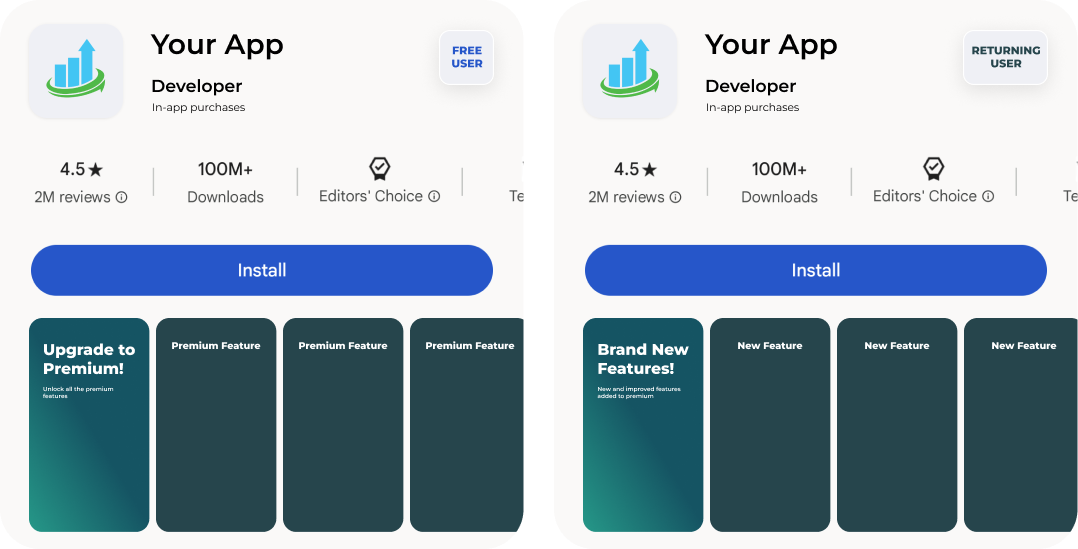
Back to the blogUsing Custom Audiences to Personalize the Play Store
Once Custom Audiences are in place via the Grouping API, developers can use Custom Store Listings to show tailored versions of the Play Store listing to each group. These listings allow different messages and visuals to reach users based on who they are and how they engage with the app. For example:- Free users who haven’t made a purchase might see upgrade prompts.
- Long-time users with lots of activity could get highlights of new features.
- Players stuck on a level may get tips or premium tools.
- Lapsed users can be shown updates or new features to encourage them to come back.
Setting Up Custom Audiences
There are two main ways to create custom audiences in Google Play:- CSV Upload Developers can upload a list of user emails in CSV format to create an audience manually. This works well for targeting specific known users.
- Google Play Grouping API This option uses in-app data to automatically tag users based on their behavior, preferences, or account status. It’s useful for ongoing, dynamic audience creation without manual input.